



Today April 11, 2012 Google have updated the Google+ Pages. If you are a business or individual it is time for you to move over to Google+. The Google+ Social Network is not going to go away and Google is heavily investing into the social network and integrating the Social Network into Google Search, YouTube, Google Maps, Google Documents and all other Google Products.
If you are using Google to create business for your business it may be the most important Search Engine Optimization and Social Media Investment that your company can do at this stage.
The Google+ Social Network is still young, it only launched on September 20, 2011. On January 19, 2012, it was reported that Google+ had surpassed a user base of 90 million. According to independent analysis of its growth in December 2011, the site was adding an estimated number of 625,000 new users a day, which may total 400 million members by the end of 2012
We here at Car Site have our own +Car Shows Google+ page, from our Google Analytics it shows that Google+ send more traffic to our website than Facebook and Twitter. Our website is ranked according to Alexa in the top 100 000 websites in the world and we receive quite a lot of traffic and people who +1 our posts. With Google “personal search” we influence our visitors directly and indirectly via their friends and from statistics it shows that we have received a big jump in traffic and conversions since we joined the Google+ Social Network.
The new Google+ Social Network Look.
Today Google adopted a new layout for the Google+ site. Google+ has produced this video to show people some of the new features in Google+ and how it works. Below you will also find more information about the new Google+ Social Network look and feel.
How does Google+ work?
First you need to create your own Google+ profile if you do not have one yet. You can visit
and click on “create a new account” to create your Google+ Account.
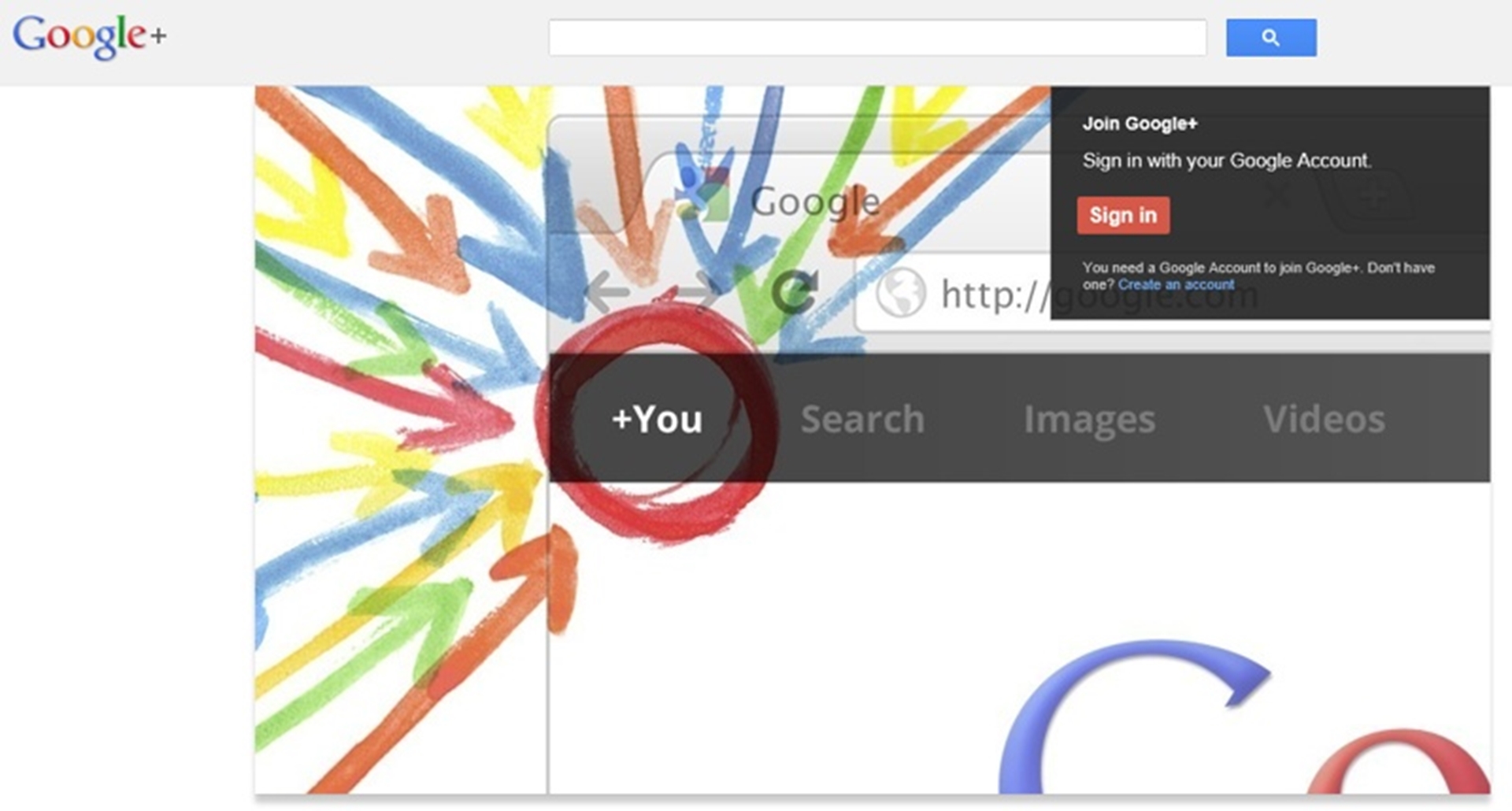
“Screenshot of the Google+ Homepage where you can register a new account”
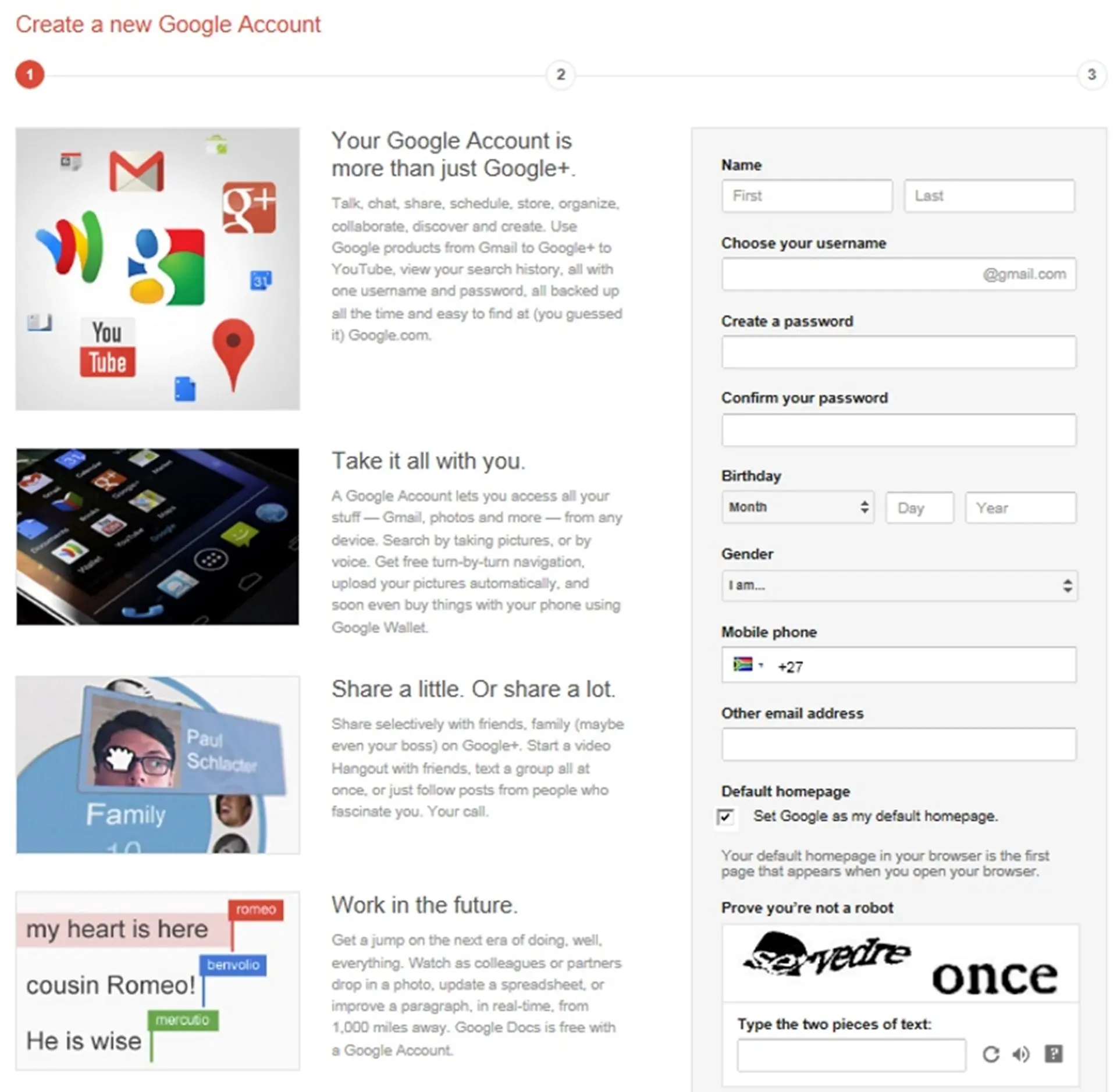
“Screenshot of the Google+ Signup Page, Simply complete the form to signup for your New Google+ Account”
Complete the Next Steps to Create Your Google+ Account
In the next steps Google will make some suggestions of friends and people that you can add to your Google+ page to help you get started. You can also add me to your Google+ pages if you want
and the
site. You will also have the opportunity to upload your profile picture and to add information about yourself.
We recommend that you use a real photo of yourself, a clear headshot if possible. You should also complete your “About Yourself section”. If you want to use Google+ to promote your business and to build a business social network it is important that you write atleast 300+ words about yourself in the About Section. You can also include a link to your website in the about section.
Once you have completed the Google+ Signup process your Google+ page will be ready and you will be able to start using it.
The New Google+ Design.
Since Google+ have just updated their Google+ Design we will run through some of the changes to familiarize yourself with the Google+ Update.
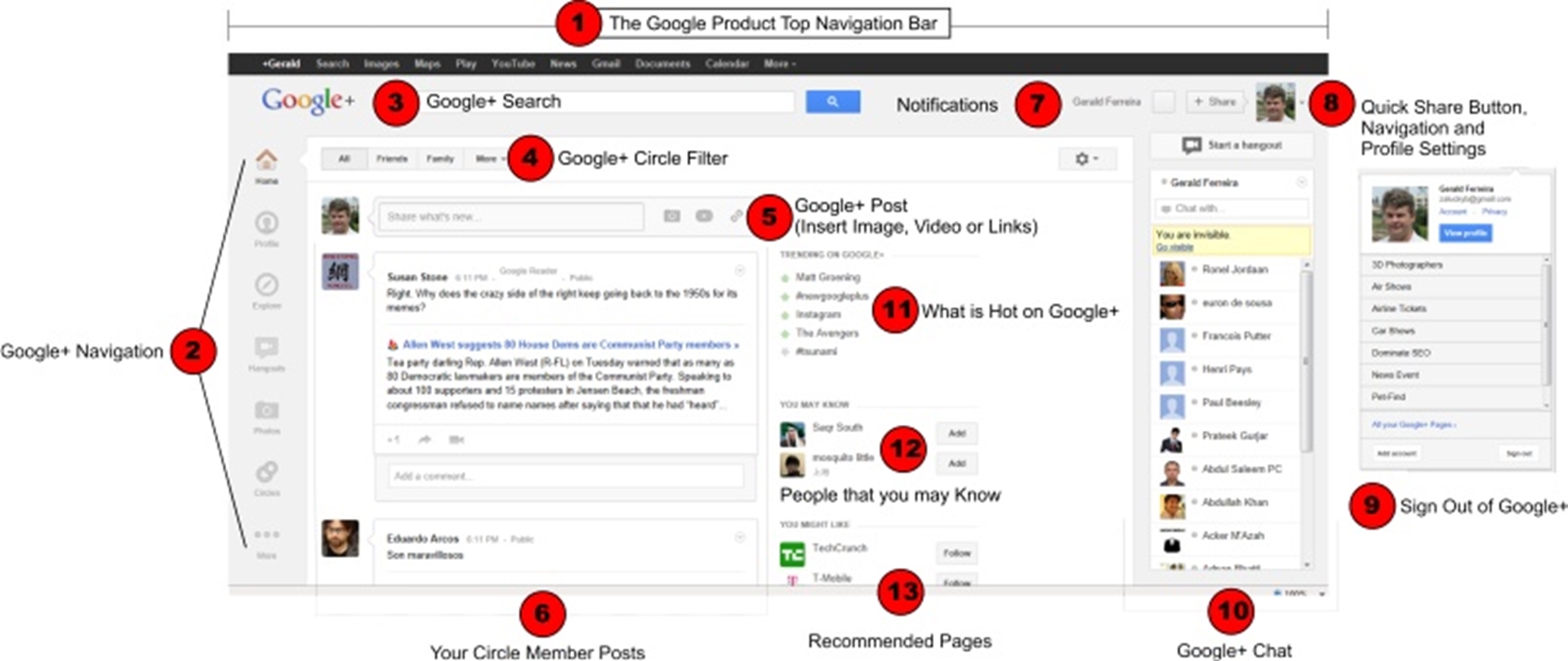
1. Google+ Top Toolbar and Google Product Navigation
The Google+ Top Toolbar display links the most Popular Google Products. From the top Google+ Navigation toolbar you can access Google+, Google Search, Google Images, Google Maps, Google Play, YouTube, Gmail, Google News and other Google Products. The Google+ Toolbar at the top of Google+ makes it easy to navigate from one Google Product to the other.
The Google+ Top Toolbar is not a static Toolbar anymore and if you scroll down your Google+ page the toolbar disapears.
2. Google+ Navigation
On the left side you will find the new Google+ Navigation Bar, this allows you to navigate all Google+ spesific pages. In the Google+ Navigation bar you can access things like Home (This is where your Circle Member Posts Display). You can view your Profile (In your profile page, you can update things like your photo, description, school and location. The Google+ Profile page also allow you to view only your posts, and the comments on your posts.
You can also view your photos by clicking on the Photos icon in the Google+ Navigation bar, view your circles and play games. At the bottom of the Google+ Navigation bar is a more icon allowing you to view more pages and functions from your Google+ page. The more is a good indication that Google+ is planning many more options as part of their Google+ pages.
3. Google+ Search Bar
The Google+ Search Bar allows you to search Google+. The Google+ search comments and posts from Google+ and also search posts of people who have posted public which may not be within your circles. The Google+ Search searches the Google+ pages and include some results from the normal Google Search engine.
Searching in Google+ provides a total different experience and result set from normal Google Search and offers a great alternative to the world’s number one search engine. The Searches are more social and opinion based.
4. Google Post and Circle Filter
The Google+ Post allows you to easily filter between your circles. If you select one of the Circles from the Google+ Filter list you will only see posts that were made by people from that circle. Google+ revolutionized the way you can organize people within your Google+ account. This makes it possible to easily switch between true friends, Google+ Friends and Interesting People or Business associates and clients.
5. Google+ Post Box
The Google+ Post Box is where you make posts on your Google+ pages. If you want to share something with your followers simply add your message in the post box. If you add a url in your post Google+ will automatically create a link, add a thumbnail image from the url and even add a short discription to your post. If you do not like the thumbnail you can choose another if it is available or completely disable thumbnails. You can also remove the description if you want to.
The Google+ Post Box allows you to add videos directly from YouTube or you can upload a video from the post box.
6. Google+ Circle Member Posts
Just below the post box is the Google+ Circle Member posts. Depending on your Filter selections your circle members and friend posts will appear in this area. You can also use this area to +1 a post that you like and also share it with friends. You can share it to a spesific circle or share it public.
You can also view the activitity of the post within the Google+ Circle Member Post area.
7. Google+ Notifications
The Google+ Notifications allows you to view your notifications. If someone add you to Google+ the Notifications block will become highlighted in red and show the number of people who have added you to Google. It also show notifications of comments or if someone has +1 your post!
8 and 9 Quick Share Button, Navigation and Profile Settings
If you want to sign out of your Google+ Account you can sign out using the Profile Icon on the right hand side of your Google+ page. If you click on the icon you will also get links to all your Google+ Pages or pages where you have administrative permissions. The Quick Share button also allows you a quick and convenient means of adding a post or common to your Google+ page.
10. Google+ Chat
The Google+ Char is also now more prominent in the Google+ pages. The Chat is now located on the right hand side of the Google+ Page and display even if you move up or down the page. The Google+ Chat have also been upgraded and you can now see the profile picture next to the name of the people that are displayed in the Chat Area.
11. What is hot on Google+
On the Google+ Homepage there is also now a section called “What is hot on Google+” this shows you what is currently trending on Google+. This is similar to breaking news and offers you the opportunity to always be up to date with the most talked about subject on Google+ and likely the most talked about in the world. This is an almost realtime indication of the hottest topics on the internet.
12. Google+ Recommended Friends and People
In this section Google offer it’s users the opportunity to grow their social network profile and find friends or people with similar interest. In the old Google+ it were much more difficult to find people and friends on Google+. The new Google+ Recommended Friends and People make it easier to find new friends, old friends and interesting people on Google+.
13. Recommended Pages
The Recommended pages is also a new feature on Google+. This feature makes it easy to find pages that you might be interested it is very likely that Google+ knows what you find interesting and base these recommendations on your individual search behavior.


